Box Throws in Free 50GBs!

I'm a paid, and happy, user of Dropbox but with the other company Box updating their iOS app to 3.0 and throwing in free 50GBs for life, I might just have to switch on over! That's a steal in my book. I also wouldn't be surprised if Dropbox threw something out there too in the next week or so so keep an eye out. If anything, there's nothing to lose with signing up!

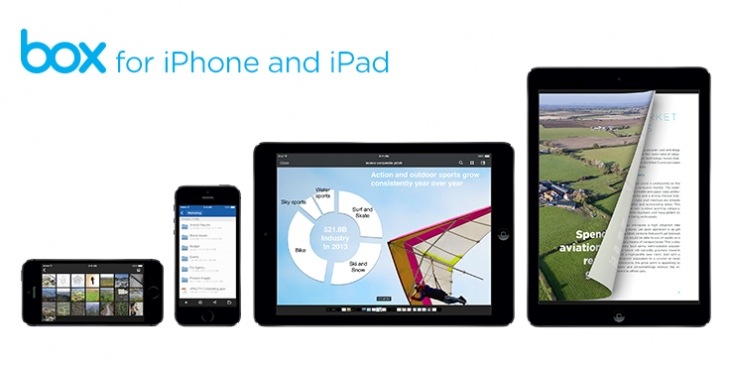
We couldn’t be more excited to announce that today we are releasing our brand new, completely rebuilt Box for iPhone® and iPad® app. And to commemorate this, we are offering 50GB of free storage for life to users who download the app in the next 30 days.

box

The Super Awesome Trinity Knot for Neckties

I'm definitely a lot more comfortable these days with tying a bow tie thanks to Mr. Offshoreorganbuilder, but this is something new to me! This Trinity knot is my next knot! I guarantee it! Watch Alex Krasny do it up! Maybe I'll even post a knot selfie on my Instagram later this week. http://youtu.be/QPyxTrhsBiM

Here's a picture of it too!

Trinityknot

Maddux's Respect for Tony Gwynn

Greg Maddux on the secrets to his pitching success via Thomas Boswell for the Washington Post. If you're a San Diego Padres fan, you'll enjoy this! San Diego Padres Photo Day

Maddux should be one of the most-copied pitchers ever, yet few would even know where to begin, because he seldom opened up about what he believed about pitching and why.

First, Maddux was convinced no hitter could tell the speed of a pitch with any meaningful accuracy. To demonstrate, he pointed at a road a quarter-mile away and said it was impossible to tell if a car was going 55, 65 or 75 mph unless there was another car nearby to offer a point of reference.

“You just can’t do it,” he said. Sometimes hitters can pick up differences in spin. They can identify pitches if there are different releases points or if a curveball starts with an upward hump as it leaves the pitcher’s hand. But if a pitcher can change speeds, every hitter is helpless, limited by human vision.

“Except,” Maddux said, “for that [expletive] Tony Gwynn.”

Timing Your Mac Usage

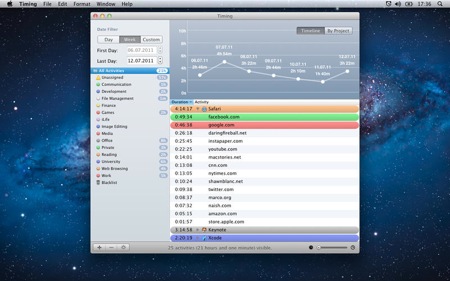
Have you ever wanted to know what the heck you're spending all your time on the computer doing? Now you can track what applications, website, etc are taking most of your time. I'm hoping to use 'Timing' to increase my productivity.

Timing automatically tracks which documents you are editing, which applications you use, and the domains of the websites you visit. You'll never have to worry about forgetting to start or stop a timer again - there are none! It's all done in the background!

For the next couple of days, you can purchase Timing by Thomas Osthege and Daniel Alm at 50% off! If you don't trust my recommendation, then check out the free version, Timing lite, which only allows you to show todays' and yesterdays' data. But seriously, at $4.99, there's nothing to complain about! For a full list of apps that can be tracked with Timing, refer to the FAQ.

thomas osthege

Inside Clash of Clans' North44's George "Jorge" Yao

If you are predisposed to having an addictive nature and download Clash of Clans (iOS/Android), you're bound to get sucked in. Hopefully you won't spend too much money on in-app purchases buying gems or upgrading your town, but it's hard to resist the temptation especially when going for that third builder! Clashofclans jorgeyao

I'll admit that I was really into it and still dabble from time to time but I've seen friends and family glued to their screens for hours every night trying to stay on top of their town. Heck, even one Christmas mass involved some Clash of Clans gaming though I'll admit I wasn't the guilty one. Hell, even my barber boasts about his clan and shows me his town EVERY time I come in. When he's not cutting hair, he's clashing and clanning it with the other three chairs.

The NY Times posted a great insight on North44's George Yao and how he was able to maintain being the top player for 6 months in the Clash of Clan Universe.

There was a price, however, for being the world’s premier Clasher. Part of it was measurable. To stay on top, Mr. Yao was spending at least $250 a week on the gems. By the time he had dominated the leader board for three months, he told me, he had sunk as much as $3,000 into Clash and was running out of money. He feared that he couldn’t keep up with wealthier rivals and threatened to quit.

To grasp the extent of Mr. Yao’s immersion in the game, you have to understand a little more about the strategy of Clash. In order to keep your trophy count high, a premier player has to avoid being attacked by other top contenders. You can do this either by staying constantly online or by the protection of a “shield” that usually lasts for 12 hours. You automatically get a shield when an attacker destroys 40 percent of your village or your town hall.

In time, he found another, simpler way to shield himself. When a member of North 44 would quit the game, Mr. Yao would take over his account. Then Mr. Yao would use one of his multiple accounts to attack himself when he needed a shield. In order to pull this off, though, he had to keep all of these other accounts highly ranked, which meant playing as many as five accounts at the same time, around the clock. Another wealthy clan member in the United Arab Emirates bought Mr. Yao three iPads to make this feasible — but even then, it was feasible only in the technical sense. At one point, he was bringing five iPads into the shower with him, each wrapped in a plastic bag, so that none of his accounts would go inactive.

Of course, he's retired since then and can't stand the site of the game.

Trade in your Starbucks for Tonx!

If you haven't been on aware, I'm an avid coffee drinker. My morning ritual the past 18 months goes as this:

  • I select the 15 grind setting on my Baratza Virtuoso and start it immediately after my Medelco Glass Kettle starts screaming.
  • I then pour the hot water into my Hario Buono Kettle, pour my freshly ground beans in my Able Brewing Kone Filter which sits upon a Hario V60 02 Drip Ceramic Filter, aiming for a 27g/360ml water to coffee ratio over 3:00 minutes.
  • I pour for 30 seconds to 60g, then wait another 30 seconds for bloom.
  • I take a huge whiff of the brew, and then pour another 120g to stopping at 180 and rest for another 20 seconds. Then I top it off reaching 360.

It might seem complicated but believe me, the cup is FRESH and it really isn't that much of a hassle! This past Christmas, I brought the setup to a friend's house and had a great time making coffee for everyone!

So, I'm telling you all this as one of my favorite coffee roasters, just this morning, launched a Starbucks to better coffee exchange program! You read that right! Trade in your Starbucks gift cards for dollar-to-dollar credit towards a Tonx subscription and get the freshest beans delivered straight to your door!

OUR PHILOSOPHY

We Source. We Roast. We Ship. You Brew. At Tonx, we believe great coffee starts with great beans and the best cup of coffee can be made easily at home. That’s why we source from top producers, roast to perfection, and ship our beans within hours of completion. Our brew guides and expert staff will have you brewing the best cup of coffee in no time.

They line up an oddly priced $38 Starbucks gift card to 8 frappucinos, or 11 cappuccinos, or 17 drip coffees, vs 48 cups of "carefully sourced, expertly roasted, super fresh coffee." I couldn't agree more.

Trust me, this isn't a marketing scheme. The coffee that I have received from Tonx over the past year has been some of the best mornings ever! The only benefit for me is that if you use my link, I earn credit towards my coffee habit too.

Tonx has made it really easy for you too! Just head to https://tonx.org/better/new and enter your Starbucks card number and security code, then it will enter a que to which it will be covered to Tonx subscription credit! I'm in the midst of trading in my $25 that I received for Christmas. It's like upgrading your gift!

Tonx better coffee

DaisyDisk App Review

Here's an amazing review of the app DaisyDisk by a good friend Hung Nguyen. It's his first guest post here on elijahnicolas.com and I can't wait for more from him in 2014. Let's give him a warm welcome with retweets and comments!


DaisyDisk by Hung Nguyen

Critically low on disk space to where I no longer could make full backups of my iPhone, I dug into the usual suspects folders such as Downloads, Movies, and my Other folder ::wink:: to do some housecleaning, only to discover that they consumed a scant amount of space. Of the 159 GB, paltry by todays standards I know, where the f**k was 60% of it? I spent about fifteen more minutes digging through a few Finder windows, and then I opened up iTunes, my eyes glazed over by the multitude of indicators, buttons, and menus, and I said to myself "You could spend the next hour fumbling your way through this godforsaken app, or you can find a good diskspace management app and let it do the work while you make yourself a sandwich." Well I don't think I have to tell you which option I chose.

I chose the latter option dammit. A quick Google search and up came a flowery titled app called DaisyDisk. The name made me smile, and a review I read online was glowing. Easy to use and I only have to spend $10? Now we're talking. Bought it through the AppStore and it arrived in seconds. Upon startup, the software asks that you give it permission to read your hard drive, a one time drag and drop operation. Easy enough. Click on SCAN and wait a few minutes. For my 159 GB hard drive on an old 2GHZ Core 2 Duo, I believe it took roughly 6-8 minutes to complete. During this time I happened to connect my WD My Book external drive and DaisyDisk automatically detected and displayed it in its UI; the active scan on the primary drive was unaffected. Nice.

Daisydisk map

After the scan completed, I was presented a high level analysis of the disk usage. My main user profile happened to be using almost 90% of the disk space, Applications used the second most, and so on. But here's where I became impressed. When I clicked on the info table, which was color coded and easy to read, the UI smoothly drilled down to the next level. The animations and menu transitions are reminiscent of Minority Report in its fluidity and sleekness.

Alright, the Pictures folder is using a fair amount, which was to be expected from a self-professed abuser of selfies, but what's this? The Music folder was taking a significant amount of space, much more than I had expected. All my music listening is through streaming services. Intrigued, I dug deeper, again by simply clicking on the file items displayed in the analysis table. Eventually, the app revealed that Podcasts and iTunesU were using about 20 GB of space. It reminded me of the time I subscribed in a flurry to thirty different podcasts as part of an ill-fated effort to get smart. Tell me how that worked out, I ask you.

Best of all, DaisyDisk makes it dead simple to delete these files. You drag the files/folders you want to delete, in my case entire folders of Podcast and iTunesU subscriptions, to a designated area in the UI which acts as a sort of dumpster. When there is any item in the dumpster, a Delete button appears alongside some topical info about its contents. Once you're ready to delete all that crap, you click on Delete, and you get a 5 second countdown to stop the process before DaisyDisk takes out the trash for good. The application gives ample warning these files will be permanently deleted in case you think this is all fun and games. This is not a game.

Upon deletion of all your educational media you procured with deluded aspirations, DaisyDisk congratulates you with a cheeky message about how you should feel good for being able to delete a file. The message went something like "Yee-haw! You just deleted your files!" or some close approximation to it. You even have the option of tweeting your accomplishment if you're one of those types. Overall, DaisyDisk is impressive software and I highly recommended it.